KnowLEDGEBASE · WINDOWS
Cómo crear directorios virtuales en WebSitePanel
Última actualización 2019-02-03
Un directorio virtual es un nombre amistoso, o alias, dúnbsp; para un directorio físico en su servidor que no reside en el directorio de inicio. Por ejemplo, si creas un directorio virtual llamado “images sensiblerdquo; desde una carpeta en cualquier lugar de tu servidor, el contenido de esa carpeta aparecerá en Pulsp;http://www.mydomain.com/images/ a pesar de que no están físicamente ubicados en las imágenes/ subcarpeta de su sitio web, bordesquo;s carpeta raíz.
Cómo crear un directorio virtual en un sitio web:
Paso 1. Abra el paso adelante;Sitio Web Propiedades& nbsp;page haciendo clic en el nombre del sitio web bajo el "ldquo;Website sensiblerdquo; Link
Paso 2. Seleccione el punto de contacto;Dirs virtuales& nbsp;tab y haga clic en el botón;Crear directorioAbsp;button. El grupo de personas;Añadir Directorio Virtual& nbsp;page se abrirá.

Paso 3. En el punto 3;Nombre del directorio box, escriba un nombre para el directorio virtual. & nbsp ; En el cónbsp;Folder box, escriba o busque en el directorio físico en el que reside el directorio virtual.

Paso 4. Haga clic en el botón .Crear directorioAbsp;button. El grupo de personas;Propiedades del directorio virtual& nbsp;page se abrirá. Esta página es una versión limitada como la página de propiedades de un sitio web.
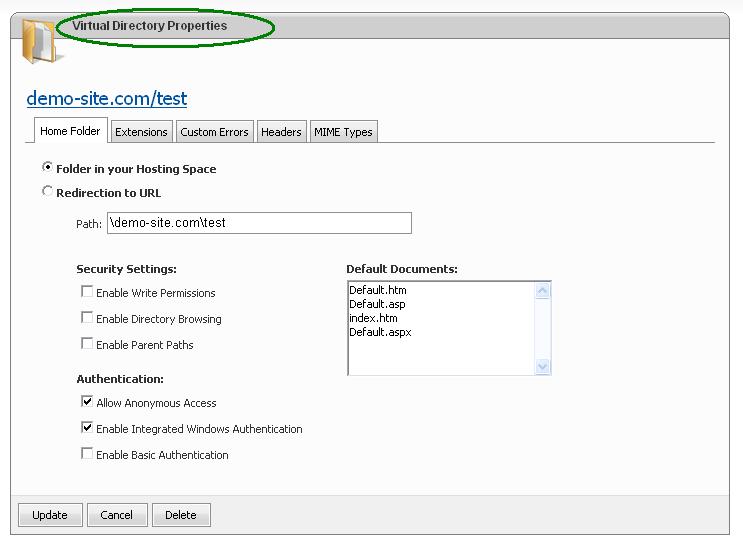
Esto concluye cómo crear un directorio virtual en WebSitePanel
nbsp;
Díganos qué tiene que estar levantado.
Una breve conversación con un ingeniero. Sin cita-bot, sin cola de callback.