OpenClaw server · preinstalled · KVM VPS
Your own AI assistant, always on.
OpenClaw, the open-source personal AI agent, preinstalled on a KVM VPS that's yours, connected to your chat apps and your model key. Order it and the gateway comes up ready: full root, self-managed, with paid Server Management at checkout if you'd rather we ran the box.
What OpenClaw is
OpenClaw is a personal AI assistant you run yourself; in the project’s own words, it answers you on the channels you already use. You message it on WhatsApp or Telegram the way you would message a person. It remembers, it can do work on a schedule, it can talk out loud, and it thinks with whichever AI model you hand it a key for. It is MIT-licensed and free. It is also very new: the first code landed in November 2025, and in the months since it has gathered more than 380,000 stars on GitHub, among the most-starred projects there, ever. It moves at that speed too, which is the part worth planning for.
The software is the open-source project from openclaw.ai. We run the server it sits on; we are not affiliated with the project.
- 380,000+ GitHub stars
- 360+ Contributors
- MIT Open source, free
-
It answers where you already are
WhatsApp, Telegram, Slack, Discord, Signal, iMessage, Teams and about sixteen more: all through one gateway. No new app to check.
-
Memory you can actually read
It keeps what it learns as plain Markdown in a workspace on your disk. In the project’s words, the model only remembers what gets saved to disk; there is no hidden state to take on trust.
-
Work that happens on a schedule
Built-in cron, with jobs persisted to disk so they survive a restart. They run inside the gateway process, which is precisely why that process has to stay up.
-
Voice, and a canvas
Wake it by voice and talk to it on macOS, iOS and Android; watch it work on a live canvas; reach it from companion apps on Windows and Mac.
-
Any model you like
Anthropic, OpenAI, Google, xAI or OpenRouter: you bring the key and pick the model. You pay the model provider directly at their price, with nothing added by us.
Why it wants a server
Setting OpenClaw up installs its gateway as a background service, because the thing has to keep running to be any use: scheduled jobs execute inside that process, and an assistant that is asleep cannot answer you. A laptop closes. A small always-on machine does not, and it keeps the memory, the workspace and the keys on hardware you control rather than a platform you rent.
Why run OpenClaw with us
One tenant
A gateway of your own
OpenClaw is built around one trusted operator per gateway: its own docs say hostile multi-tenant isolation is not a goal. So you get your own instance on your own machine, which is the arrangement the project actually supports, rather than a slice of someone’s shared one.
Private
On your server, not a SaaS
The agent runs on a VPS that is yours, in our datacenter. Your conversations, memory and connected accounts stay on your instance, not pooled in someone else’s cloud.
One-click
Preinstalled, comes up ready
Order and the box arrives with OpenClaw installed and its gateway registered as a service, so it survives reboots from day one. No Docker, no reverse-proxy wrangling before you say hello.
Yours
Self-managed, care on tap
OpenClaw moves fast, and on a self-managed VPS updating it is your call, with a daily full-disk VM backup under you as the safety net. Full root means nothing stops you; and if you would rather not look after a Linux box at all, paid Server Management tiers are right there at checkout.
systemctl is-active openclawactive su - openclaw -c 'openclaw --version'OpenClaw 2026.7.1-2 (0790d9f) ss -tlnp | grep 18789LISTEN 0 511 0.0.0.0:18789 users:(("openclaw-gatewa",pid=8507))- Every weekday at 9, send me yesterday’s order count.
- Saved. I’ll message you here each weekday at 09:00.
- What did I tell you about invoices?
- From your memory file: they go to accounts@, never to you.
How it works
-
01
Pick a plan
Three tiers on KVM hardware: start where your workload fits and move up later.
-
02
The image does the setup
Pick where the server lives (India, Germany or the US) and your VPS deploys with OpenClaw installed and its gateway registered as a service. Optional extras (offsite backups, paid Server Management) are there to take or leave.
-
03
Add your LLM key and channels
Connect your own model provider (Anthropic, OpenAI, Google, OpenRouter…) and the chat channels you use. Inference is billed by your provider, and never appears on your hosting bill.
-
04
Yours to run
It is a self-managed VPS with full root: you decide when to update OpenClaw and what runs beside it. Hardware, network and the virtualisation layer are on us. If you would rather not look after a Linux box, Server Management tiers are at checkout.
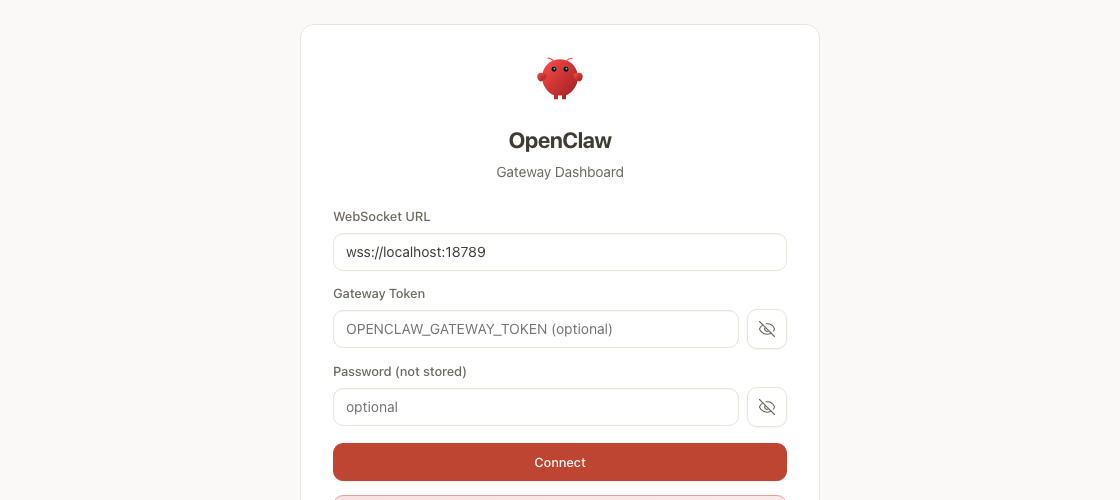
Claiming it, once
-
01
Open the dashboard
Browse to https://your-server-ip:18789 and accept the self-signed certificate. The gateway generates its own on first boot, so your browser will not know it yet. Use the IPv4 address your server was delivered with: that is where the dashboard answers, and every plan on this page includes one.
-
02
Fetch your gateway token
Over SSH, read it from the gateway config. It is generated on your machine and never leaves it.
ssh root@your-server-ip grep token /home/openclaw/.openclaw/openclaw.json -
03
Connect
Paste the token into the Gateway Token field and press Connect.
-
04
Approve the device
Pairing is approved from the server, so a browser alone cannot claim your gateway.
su - openclaw -c "openclaw devices list"
su - openclaw -c "openclaw devices approve <requestId>"
The token is generated on your own machine and read over SSH. We never see it, and pairing is approved from the server, so a browser alone cannot claim your gateway.
Run it yourself, or rent it
On a VPS of your own
- Your own model key, billed to you by the provider you picked.
- Memory is Markdown and the schedule is a file, both on your disk.
- Root on the box, so you install whatever tools you want beside it.
- One flat monthly price for the server, whoever ends up using it.
- A daily full-disk backup of the VM is included.
On a subscription
- Usually billed per person, per month.
- History and settings live on the vendor’s servers.
- The model is generally whichever one the vendor ships.
- Usually no shell, so the toolset is what the vendor built.
Plans & pricing
Every plan includes 1 TB bandwidth · 1 IPv4 + 1 IPv6 · OpenClaw preinstalled, comes up ready · Bring your own LLM key · Full root · KVM · self-managed · Daily VM disk backup
O1 Starter
₹2,014/mo
- 2 vCPU
- 4 GB RAM
- 50 GB NVMe SSD
- 1 TB bandwidth
- 1 IPv4 + 1 IPv6
- OpenClaw preinstalled, comes up ready
- Bring your own LLM key
- Full root · KVM · self-managed
- Daily VM disk backup
O2 Everyday
₹3,167/mo
- 4 vCPU
- 8 GB RAM
- 80 GB NVMe SSD
- 1 TB bandwidth
- 1 IPv4 + 1 IPv6
- OpenClaw preinstalled, comes up ready
- Bring your own LLM key
- Full root · KVM · self-managed
- Daily VM disk backup
O3 Multi
₹4,749/mo
- 6 vCPU
- 16 GB RAM
- 120 GB NVMe SSD
- 1 TB bandwidth
- 1 IPv4 + 1 IPv6
- OpenClaw preinstalled, comes up ready
- Bring your own LLM key
- Full root · KVM · self-managed
- Daily VM disk backup
- Seamless migration from your current host
- No lock-in, cancel anytime
- SLA-backed 99.9% uptime
- Plan prices exclude 18% GST, added at checkout for billing addresses in India
Bring your own LLM key
OpenClaw connects to whichever AI provider you choose: Anthropic, OpenAI, Google, OpenRouter, or a model you host yourself. You add your key after setup, so you pay that provider directly, at their rates, with nothing added by us. Model usage is billed by them rather than in your hosting price, and you can switch provider whenever you like. We help you wire it up and keep the key safe on the box.
Questions
Which AI models can I use?
Your own: Anthropic Claude, OpenAI, Google Gemini, xAI, or an OpenRouter key. You add the key after setup and choose the model. Model usage is billed by that provider and is not part of your hosting bill.
Which chat channels does it support?
Around two dozen from a single gateway: WhatsApp, Telegram, Slack, Discord, Signal, iMessage, Google Chat, Teams, Matrix and more. We help you connect the ones you use.
Do I need to run commands to install it?
Not to get it running. Ordering provisions a VPS with OpenClaw pre-installed and its gateway registered as a service, so it comes back up on its own after a reboot. Connecting your channels and your model key is yours to do; OpenClaw’s own onboarding walks you through it, and an engineer can point you right if you get stuck.
What does “self-managed” mean here?
The base plans are a real KVM VPS with full root that you run: OS updates, OpenClaw updates and housekeeping are in your hands. Hardware, network and the virtualisation layer are ours. If you want our engineers on the box (updates, monitoring, hardening), add a paid Server Management tier at checkout.
Are backups included?
Yes, at VM level: we take a daily full-disk backup of your instance, and that is what brings the whole server back if something goes badly wrong. Restoring an individual file or database is yours to do on a self-managed box, so keep your own copies of anything you cannot lose. The “Offsite Backups for Data” option at checkout adds offsite copies and longer retention. And since OpenClaw keeps its memory as plain files, your own exports are easy.
How private is this, really?
Your instance is single-tenant: your own box, your own gateway, in the datacenter region you choose at checkout (India, Germany or the US), and OpenClaw keeps its memory as plain files you can read yourself, so nothing about it is opaque to you. Your keys are yours, and we do not read your conversations. It is worth knowing exactly where that line sits: we operate the host, so the disk is technically reachable by us, and OpenClaw’s own documentation says resisting a compromised host is not one of its design goals. So what you get is a machine nobody else shares, plus a policy we hold ourselves to. If your threat model needs more than that, talk to us before you order and we will tell you whether this fits.
Is it safe to let an AI agent read my messages?
Treat it the way the project itself does: OpenClaw’s docs say to treat inbound messages as untrusted input, and by default the agent can act on the machine it runs on. That is what makes it useful and it is also the risk. Give it its own box (you are), be deliberate about which channels and which skills you connect, and ask us if you are unsure about one. We would rather have that conversation than have you find out later.
Is the price final?
Yes. The card price is what you pay, plus 18% GST if your billing address is in India. Promotional discounts apply to your first term.
OpenClaw is an independent open-source project. IndicHosts is not affiliated with, endorsed by, or sponsored by the OpenClaw project or the OpenClaw Foundation. We sell infrastructure for running it; the software is theirs, and we use the name only to say what runs on the server.
Ready for an assistant of your own?
Order and the gateway comes up ready for your key and your channels. Unsure which tier, or whether OpenClaw fits what you have in mind? Ask an engineer; you'll get a straight answer.